Azeroth Survivors is a WoW 1.12 client with its addon system intact, and it draws a damage meter of its own, so you need no addon to see damage per second. The addons below install from a zip.
The game's own damage meter
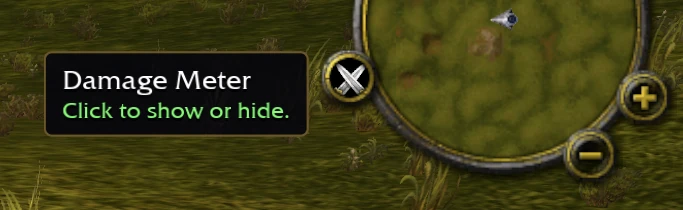
The game draws a Damage Meter itself. A button on the minimap opens it.
How to open it
1
Press the button the game draws on the minimap. Its tooltip reads Damage Meter, and each press shows or hides the window.
2
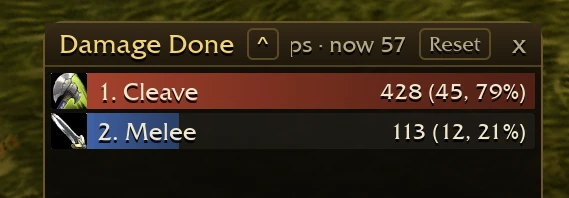
The bar above the spell names says which view is open and prints the run's damage per second beside it. The caret in that bar lists the 4 views.
What each view answers
Damage Done
The damage you dealt in this run.
Healing Done
The healing you did in this run.
Boss Damage
The damage the bosses took in this run.
Party DPS
The damage per second of the whole group, not only yours.
Turning the button back on
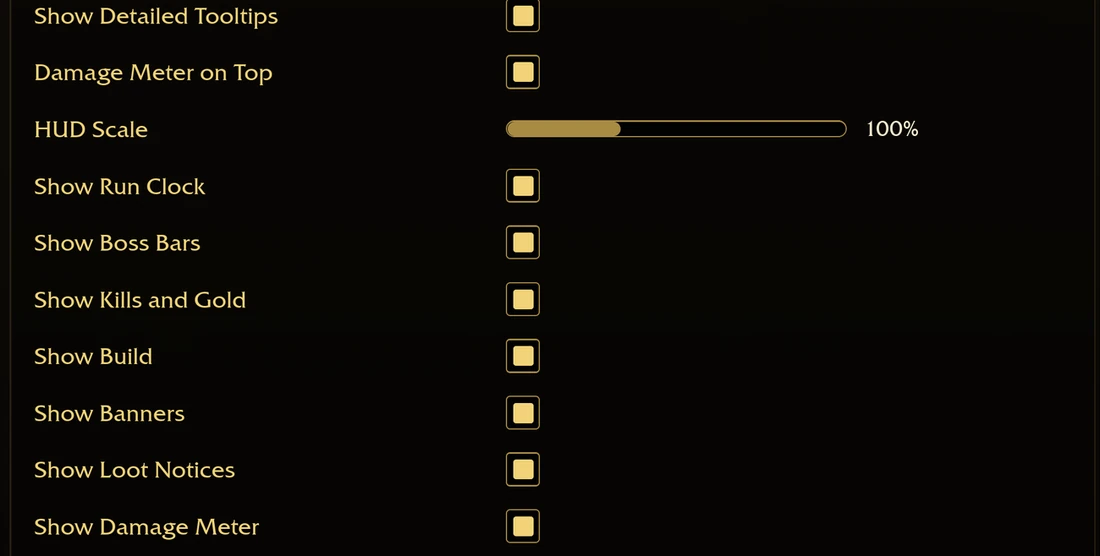
The Options screen has a Show Damage Meter switch. It draws the button and its window together. Turn it off and neither is on the screen. Turn it on and both come back.
A second option, Damage Meter on Top, keeps the meter over the level-up and jewelry cards, so you can read your damage while you pick.
An addon reads the same numbers the meter does, and AZS Spell Meter turns them into one window per spell.
The tier list uses the same measure for another question. Its clear score is damage per second worked out from the game's spell numbers, not from a run. Open the build calculator
Installing one in the browser
The AddOns page under Options installs from a zip. It keeps the files in the browser, so they are still there when you come back.
1
Open Options and choose AddOns.
2
Press Install AddOns and pick one or more .zip files.
3
Each folder in the zip that holds a .toc file becomes one addon, named after that file.
4
The addon joins the list and loads at the start of your next run.
A second install of the same name replaces the copy you had, and Remove takes an addon out of the list.
Installing one in the downloaded game
The downloaded game reads the same .toc files from an AddOns folder inside benilla-config, beside the game. Put each addon's folder there, and Open AddOns Folder shows you where it is.
What the words beside an addon mean
The AddOns page puts a word beside an addon the game will not load yet, and names what the addon is missing.
Out of date
The addon was written for another version of the game. Its .toc names that version on a line that starts with ## Interface, and this game reads 11200, the number for 1.12. The addon loads only when Load out of date AddOns is on, and the game warns that it may not work.
Loads when needed
The addon asked to load on demand rather than at the start of a run. It waits until something calls for it.
Missing
An addon it needs is not installed. The names after the word are the ones the game could not find.
Addons and launchers made for the game
The game's Discord keeps a #verified-addons channel where players post the addons and launchers they have made. This page names 5 projects and says what each one does; a project whose post gives only a name is not here.
A launcher that downloads and updates addons, keeps your saves in the cloud across Windows PCs, has a basic talent calculator and a gear builder, and tracks stats in and out of the game.
Each name that links opens the page its maker keeps, where the newer copies are. Where the post gives no page, the name stands on its own.
The developer's rule for third-party tools
The game's developer posted this in the #announcements channel of the game's Discord, and this site read it on 2026-11-04.
Third-party launchers and client addons are permitted, provided they are open source. However, please be aware of the following: We do not officially support or endorse third-party addons or launchers. All addons and launchers must be open source.
An addon is code that runs in your game. Take one from its author's page, and never run an .exe that calls itself an addon.
What the game keeps
One list for every hero: an addon you turn on is on for all of them.
Saved variables: the game writes each addon's own variables when you leave, and runs them again when the addon loads.
Lua 5.0, the language this client speaks. string.match and string.gmatch arrived with 5.1, so an addon that uses them fails here.
The 1.12 interface comes with the game: FrameXML.toc, and the files it lists.
Writing one
A 1.12 addon is a folder with a .toc that names ## Interface: 11200, and Lua or XML beside it. The game adds these calls during a run, spelled exactly as you type them. It defines more than the ones below; these are the ones a meter or a HUD uses.
The run
AZS_GetRunTime
AZS_GetRunLength
AZS_GetPhase
AZS_GetRunSummary
AZS_GetStoredLevels
AZS_IsStoringLevels
Bosses and guardians
AZS_GetUpcomingBosses
AZS_GetBosses
AZS_GetGuardians
AZS_GetSummons
AZS_GetLairs
AZS_GetFlaggedLair
The meter
AZS_GetMeter
AZS_GetHealing
AZS_GetBossMeter
AZS_GetPartyMeter
What you hold
AZS_SPELLS
AZS_BUFFS
AZS_DEBUFFS
AZS_STATS
AZS_Gear
The screen
AZS_SetHudShown
AZS_IsHudShown
AZS_SetStoringLevels
AZS_RegisterBannerHandler
AZS_UnregisterBannerHandler
Most of these read a clock, a list or a number. 2 of them change what the screen shows, and nothing here changes what a run does.
Questions
Does Azeroth Survivors have a damage meter or a DPS meter?
Yes. The Damage Meter opens from a button on the minimap and shows Damage Done, Healing Done, Boss Damage and Party DPS.
How do I open the damage meter?
Press the button on the minimap: its tooltip reads Damage Meter, and that press shows or hides it. No addon is needed for it.
Will a normal WoW 1.12 addon load?
It loads when its .toc names ## Interface: 11200. The addons above were written for this game, and the line under each name says what it does.
Do addons work in the browser?
Yes. Install AddOns on the AddOns page takes the zip, and the browser keeps the files. They stay in that browser, so another device starts empty, and clearing this site's data removes them.
Why does an addon say Out of date?
Its .toc was written for another interface number. Turn on Load out of date AddOns to load it anyway, and expect it to fail.
Are addons cheating?
No. Every call above reads a run. 2 of them change what the screen shows, and none changes what a run does.
Where do I get an addon?
From the page its maker keeps. Where the post gives that page, the name above links to it.
Where this comes from
Read from the game at https://wow.aethus.pl on 2026-11-02, and from the game's Discord on 2026-11-04. The fan rebuild this site ranks has no addon system, so none of this comes from it.